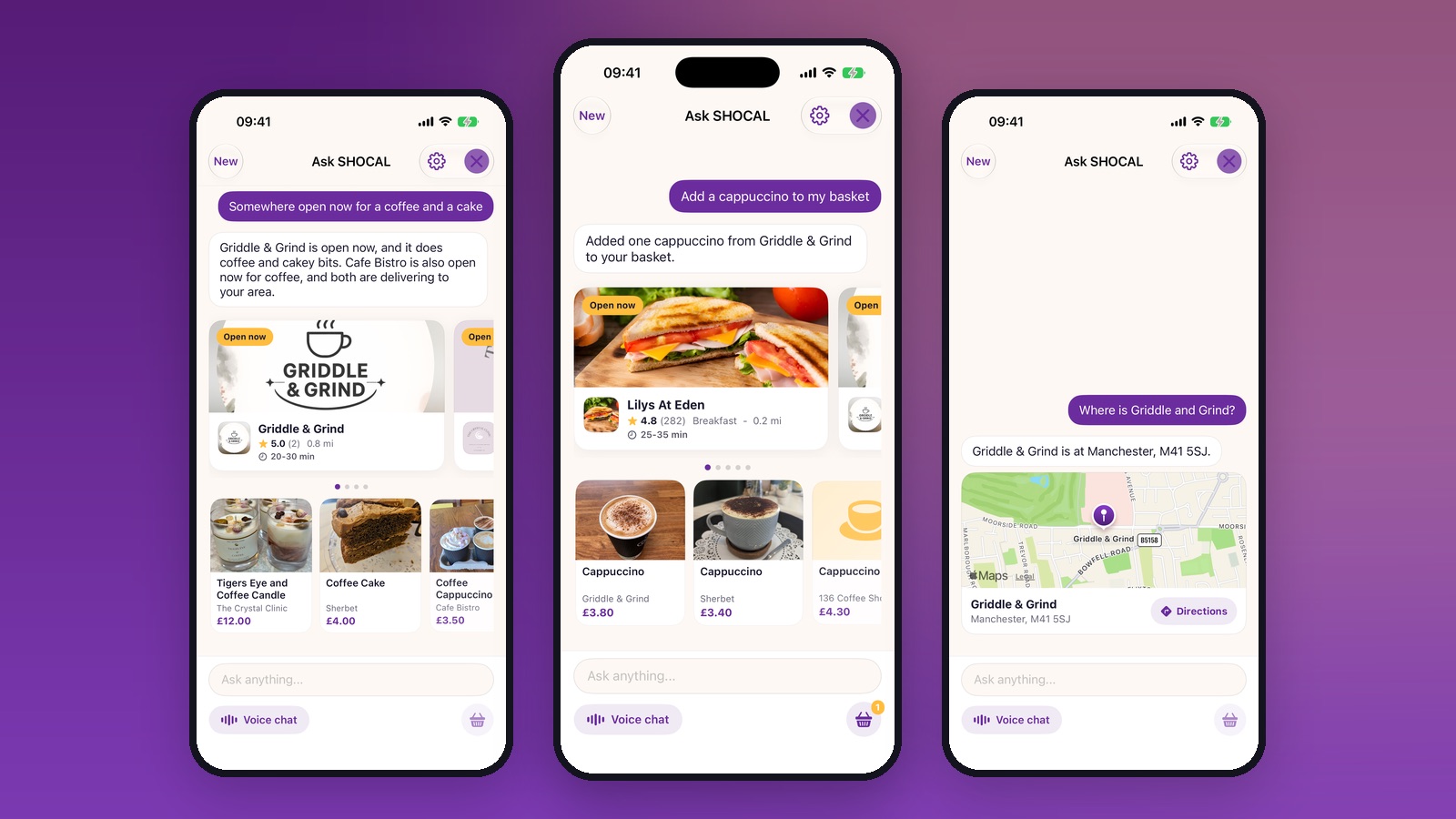
Ask SHOCAL is a new way to use the app: you type or say what you are after, in your own words, and it answers using what is actually open, in stock and priced near you right now. Not a search box with a chat bubble on it. It reads the same live data the app does, and it can put things in your basket for you.
Here is what it is like to use.
Ask it the way you would ask a friend
You do not have to know the name of the shop, or pick a category, or spell anything correctly. These all work:
- Somewhere open now for a coffee and a cake
- A treat for under a fiver
- Anywhere doing fish and chips tonight?
- What time does Sherbet close today?
- Is the butcher open tomorrow morning?
- Something hot, I am freezing
- Do any of these deliver to me?
- Any offers on tonight?
- What is popular round here?
- I need a birthday present, nothing over twenty quid
- Do you do any milkshakes?
- What is on this weekend?
- Where is Griddle and Grind?
- How many SHOCAL points do I have?
- What did I order last time?
- Where has my order got to?
- I need help with an order
- Take me to the checkout
Ask for a coffee and a cake and it does not hand you a list of every cafe in the county. It tells you which ones are open at that exact minute, which of them deliver to your postcode, and what they actually have on the menu, with the price.

It knows what is open, not what is listed
This is the part that makes it useful rather than clever. Ask what time a shop closes and you get today's real hours, including the ones that shut for an hour at lunch. Ask for somewhere open now and a shop that closed twenty minutes ago will not be in the answer.
Ask on a Sunday evening and it will tell you what is open on a Sunday evening, which is usually a much shorter list than anyone wants, but it is the true one.
It can do things, not just say things
Say "add a cappuccino to my basket" and it does exactly that, from a shop that is open and has one, at the price it is sold for.

It will show you what it picked and where from, so you can change it before you pay. You can carry on in words from there: add another one, take that off, take me to the checkout.
What it will never do is pay for anything on your behalf, cancel an order, give you a discount or refund you. Those are yours, or they are a conversation with a human. It hands you to support rather than guessing.
Finding the offers you would have missed
Ask what is on and it checks every live discount and stamp card near you, tells you the shops and the terms in plain words, and shows you the ones that are open right now.

Ask where a shop is and it draws you a map
You get the address, a pin on a map and a Directions button that opens your phone's maps app and takes you there. No copying a postcode into another app.

It knows your side of things too
Ask how many SHOCAL points you have and it tells you the number and what they are worth off your next order. Ask what you ordered last time and it can find it. Ask where your order has got to and it looks up the live one. Ask for help and it stops guessing and hands you to a person, with the button right there.

All of that is your own account and nobody else's. The assistant acts as you, so it can only ever see what you can see when you open the app yourself.
You can talk to it
There is a voice mode, so you can ask with your hands full. Speech is recognised on your own phone, which means your voice is not shipped anywhere to be turned into text.
It will get things wrong sometimes
It is new, and we would rather say so than pretend otherwise. It can misread a question, or pick the wrong shop out of two with similar names. Prices and opening times on the shop's own page are always the ones that count, so check those before you order.
We keep a record of the conversations so we can see where it goes wrong and put it right, which is the only way it gets better. If it gets something wrong, tell us in the app and we will look at that exact conversation.
Where to find it
Ask SHOCAL is rolling out in the app now. When it reaches you, you will see it on the home screen. Type a question, or tap voice chat and say it.
If you have not got the app yet, it is free on iPhone and Android.